

How to reset Tuya's Wi-Fi module and configure the network?
Last Updated on:2026-05-12 08:14:10
When receiving the module, it is suggested that, before start coding, you run the provided module debugging assistant, and connect the Wi-Fi module in MCU simulation mode to check if the module can work properly. Meanwhile, you can get familiar with the protocol interaction process, which will help you to proceed with development debugging.
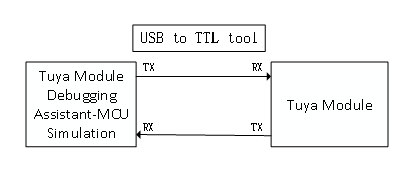
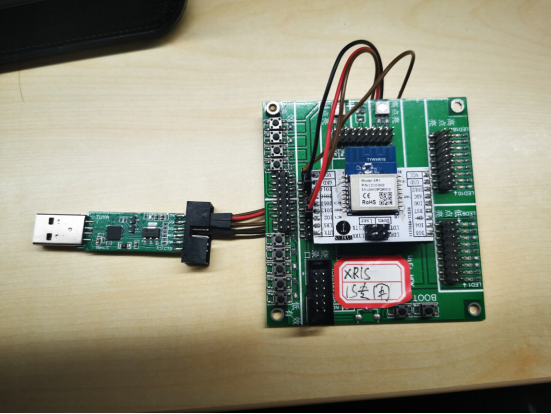
In the MCU simulation mode, the debugging assistant simulates the MCU to automatically respond to the module with the correct protocol data. After you configure the network through the mobile phone, you can test DP data reporting and sending. The procedure of operating the assistant and module pair is as follows. Before the operation, you need to learn about the operation instruction of the Tuya module debugging assistant. For beginners, see Module Debugging Assistant Instruction.
- Based on the schematic diagram of the minimum system, you build the peripheral circuit of the module and jump the wire directly in case of simple testing.
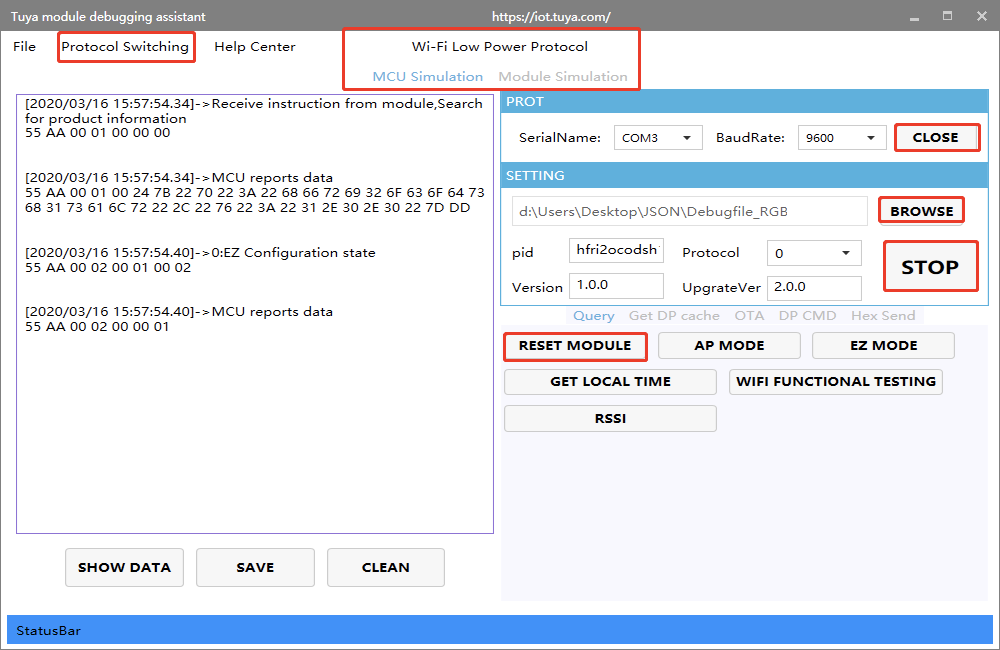
- Open the debugging assistant in the development documents, and import the debugging file. Select the Wi-Fi low power protocol and MCU simulation mode.
- Connect the module serial port to the computer through USB-to-TTL adapter, and select the corresponding serial port and Baud in the assistant. After you open the serial port and click Start, you will see the initial protocol interaction between the module and the host.Note: Wi-Fi low power module will send command 01 after power on. When receiving the correct response, it will proceed with the initial protocol interaction. If the module does not send data after power on, check if the peripheral circuit of the module is correct.
- Click Reset Module, and the module enters pair mode. The module supports two pair modes, EZ and AP (The difference between EZ and AP modes). When you click Reset, the mode will be switched. Configure network on the app according to the status. See the app operation instruction for pair operation.
Is this page helpful?
YesFeedbackMarketing Cooperation
Business Cooperation
Customer Service
Media Inquiry






Click for services and help
Help Center
Consult
(001)844-672-5646
Submit Question