

Linux系统中如何查看串口号?
更新时间:2025-06-25 02:15:39
1、首先,如果是虚拟机需要将可移动设备接入到虚拟机中。
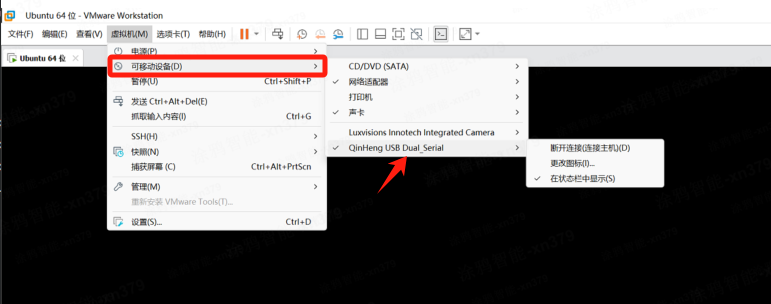
2、安装串口驱动。
3、可以使用dmesg | grep tty命令查看。
例如下方的示例,其中ttyACM0和ttyACM1就是串口号。
输入:$ dmesg |grep tty输出:[ 1.405936] printk: console [tty0] enabled[ 2.855679] 00:05: ttyS0 at I/O 0x3f8 (irq = 4, base_baud = 115200) is a 16550A[ 5297.621624] usb 2-2.1: ch341-uart converter now attached to ttyUSB0[ 5320.793242] ch341-uart ttyUSB0: failed to read modem status: -110[ 5383.118225] ch341-uart ttyUSB0: failed to read modem status: -110[ 9996.206253] ch341-uart ttyUSB0: ch341-uart converter now disconnected from ttyUSB0[ 9997.057358] usb 2-2.1: ch341-uart converter now attached to ttyUSB0[ 9998.585996] ch341-uart ttyUSB0: ch341-uart converter now disconnected from ttyUSB0[24564.797290] cdc_acm 2-2.1:1.0: ttyACM0: USB ACM device[24564.797765] cdc_acm 2-2.1:1.2: ttyACM1: USB ACM device
该内容对您有帮助吗?
是意见反馈
关注“涂鸦智能”
涂鸦服务尽在掌握

关注“全球智能商业”
第一时间获取物联网资讯





点击获取服务和帮助
帮助中心
智能客服
400-881-8611
提交工单